News

Smartwatch SDK API Android Studio

Views :
Update time : 2026/2/6 14:06:41


Developing custom smartwatch applications requires more than just coding skills—it demands deep integration with hardware, firmware, and user experience layers. For developers and procurement decision-makers exploring Smartwatch SDK API Android Studio, this guide delivers a comprehensive roadmap for building, customizing, and deploying smartwatch solutions tailored to your brand or industry.
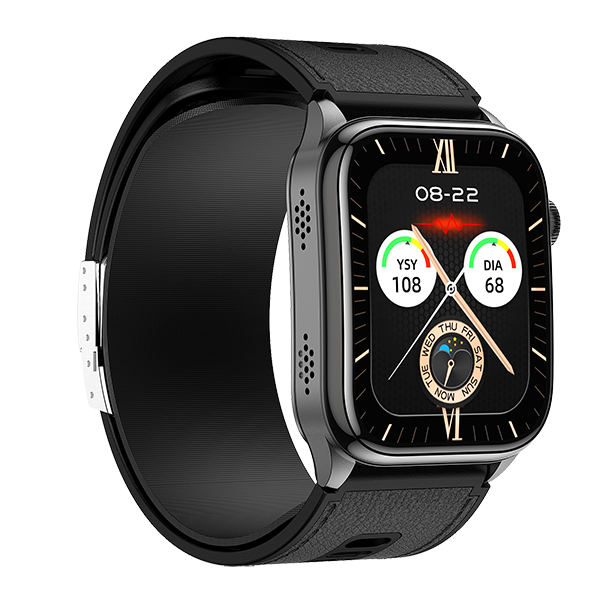

Smartwatch SDK API Android Studio


What Is Smartwatch SDK & API in Android Studio?

A Smartwatch SDK (Software Development Kit) is a collection of tools, libraries, documentation, and sample code that enables developers to build applications specifically for smartwatches. When paired with an API (Application Programming Interface), it allows controlled access to the device’s hardware features—like heart rate sensors, GPS, or vibration motors—through standardized calls within Android Studio.

SDK vs API: What’s the Difference?

  • SDK: The full development environment—includes APIs, debuggers, emulators, and documentation.
  • API: A subset of the SDK that defines how software components interact (e.g., reading step count data).

Common Use Cases

  • Launching a private-label smartwatch brand
  • Enterprise-grade wearables for healthcare, logistics, or religious compliance
  • OEM/ODM partnerships requiring deep hardware-software alignment

For B2B players, the ability to customize firmware logic, UI elements, and sensor behavior via SDK/API is non-negotiable—and Android Studio is the preferred IDE for such flexibility.


Why Use Android Studio for Smartwatch Development?

While alternatives exist (like proprietary IDEs from chipset vendors), Android Studio remains the gold standard for smartwatch app development due to:

  • Native support for Wear OS and AOSP-based systems
  • Seamless integration with Gradle, Firebase, and Google Play Services
  • Advanced debugging tools (Logcat, Layout Inspector, Profiler)
  • Bi-directional communication between phone and watch apps via Wearable Data Layer API

Many modern smartwatches—even those not running full Wear OS—use RTOS + Android App dual-architecture, where the core runs on a real-time OS (like FreeRTOS) while companion apps run on Android. Android Studio excels at managing this hybrid stack.


Smartwatch SDK API Architecture Overview

Understanding the architecture is critical before writing a single line of code. A typical Smartwatch SDK includes four logical layers:

  1. Hardware Abstraction Layer (HAL)
    Shields developers from chip-specific details (e.g., Nordic nRF52 vs. RTL8763).
  2. Firmware Interface
    Exposes low-level commands (e.g., enable SpO2 sensor, trigger OTA).
  3. SDK Service Layer
    Wraps firmware calls into safe, thread-managed Java/Kotlin methods.
  4. Android App Layer
    Your UI, business logic, and user-facing features built in Android Studio.

Communication Protocols

  • BLE (Bluetooth Low Energy): Primary channel for phone-watch sync
  • UART: Used during firmware flashing or factory testing
  • Wi-Fi (optional): For standalone internet-connected watches

Data flows from your Android app → SDK service → firmware → sensor/hardware, then back through the same path.


Key Smartwatch APIs Developers Use Most

Not all APIs are equally valuable. Focus on these high-impact interfaces:

📡 Sensor APIs

  • getHeartRate()– Real-time PPG data
  • readSpO2()– Blood oxygen saturation
  • getAccelerometerData()– Motion detection for step counting or fall alerts
  • requestGPSLocation()– For outdoor sports tracking

⚙️ System Control APIs

  • setScreenBrightness(level)
  • triggerVibration(pattern)
  • powerOffWatch()/rebootDevice()
  • registerButtonCallback()– Capture physical button presses

🔔 Notification & Messaging APIs

  • Sync call logs, SMS, and third-party app alerts from phone to watch
  • Push custom notifications (e.g., prayer time alerts for Middle Eastern markets)

❤️ Health & Fitness APIs

  • getDailySteps()
  • analyzeSleepStages()– Light, deep, REM
  • calculateCaloriesBurned(weight, activity)

🔄 OTA & Firmware Upgrade APIs

  • checkFirmwareVersion()
  • startOTAUpdate(fileUrl)– Critical for post-launch bug fixes

These APIs form the backbone of any commercial smartwatch application.


How to Integrate Smartwatch SDK in Android Studio

Integration follows a predictable workflow—assuming you’re working with an ODM-provided SDK:

Step 1: Environment Setup

  • Install Android Studio (latest stable version)
  • Add SDK.aaror.jarfiles to yourlibs/folder
  • Include dependencies inbuild.gradle:
    implementation files('libs/smartwatch-sdk-v2.1.aar')

Step 2: Configure Permissions

InAndroidManifest.xml:

<uses-permission android:name="android.permission.BLUETOOTH" />
<uses-permission android:name="android.permission.ACCESS_FINE_LOCATION" />

Step 3: Initialize the SDK

Typically done in yourApplicationclass or main Activity:

SmartwatchSDK.init(context)
SmartwatchSDK.setConnectionCallback(object : ConnectionListener { ... })

Step 4: Pair & Connect

Use BLE scanning to discover nearby watches, then establish a secure link.

Step 5: Call APIs

Once connected:

val steps = SmartwatchSDK.getHealthData().stepsToday
showOnUI(steps)

💡 Tip: Always handle disconnections gracefully—BLE links drop frequently in real-world use.


Custom Smartwatch Development with SDK & API

This is where ODM partnerships shine. With full SDK access, you can:

  • Redesign the watch face with brand colors, logos, or region-specific layouts
  • Add proprietary features (e.g., halal mode, industrial SOS button)
  • Implement private communication protocols between watch and backend
  • Optimize for specific chipsets (e.g., low-power modes on Beken BK3435)

Most reputable ODMs provide:

  • Source code for reference apps
  • Hardware adaptation layer (HAL) customization
  • Support for small-batch production (as low as 500 units)

For startups or niche brands, this level of control turns a generic wearable into a differentiated product.


Common Issues in Smartwatch SDK Development


Even experienced teams face hurdles:


Issue Root Cause Mitigation
Incomplete SDK docs Vendor rushed release Request Postman collections or Swagger specs
API inconsistency across chips HAL not abstracted well Insist on unified SDK interface
BLE disconnects Poor antenna design or power mgmt Test with multiple phone models
Android 12+ permission denials Background location restrictions Use foreground services + clear UX prompts
OTA failures Corrupted firmware packets Implement checksum + retry logic

Pro tip: Always test on real devices, not just emulators—sensor behavior varies wildly.


ODM Smartwatch SDK Support for Brands & Startups

Global demand for custom wearables is surging—especially in:

  • Europe: GDPR-compliant health data handling
  • Australia: Rugged designs for mining/agriculture
  • Middle East: Prayer time, Qibla direction, modest UI themes

A capable ODM will offer:

  • Demo SDK within 48 hours
  • NDA-protected API documentation
  • End-to-end support from prototype to mass production
  • Small MOQ options (500–1,000 units) for MVP validation

Look for partners who develop their own firmware stack—not just resellers using off-the-shelf modules.


Who Needs Smartwatch SDK API Development?

You’re likely here if you represent:

✅ A wearable startup launching your first product
✅ A digital health company integrating vitals monitoring
✅ A corporate gifting firm creating branded employee wellness watches
✅ An app development agency expanding into hardware ecosystems

If your goal is more than just white-labeling, SDK access is essential.


How to Choose the Right Smartwatch SDK Partner

Ask these five questions before signing:

  1. Does your SDK fully support Android Studio? (Not just Eclipse or Keil)
  2. Are low-level APIs exposed? (e.g., direct sensor register access)
  3. Can we define private BLE characteristics?
  4. Do you provide dedicated technical support engineers?
  5. Will you deliver firmware updates for 2+ years post-launch?

Avoid vendors who say “just use our app”—you need code-level control.



Recommended products
Read More >>
Contact Us ×
WhatsApp
Wechat / Message

Start WhatsApp instant communication

Start chatting
Click here to copy WeChat ID


Click here to Leave a Message!